
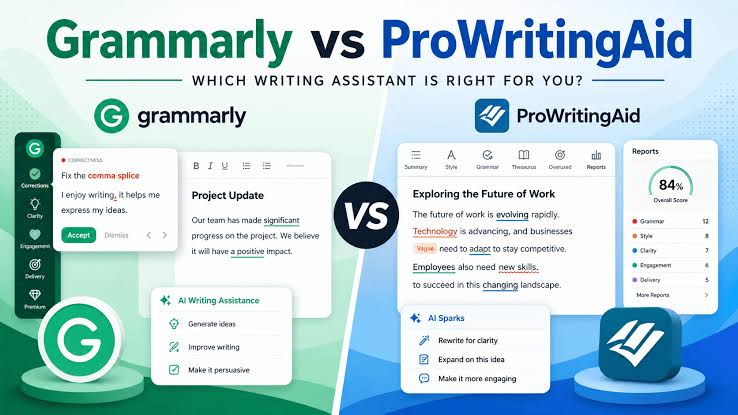
Writing in English can be challenging, especially when you are still learning grammar, building vocabulary, and trying to sound natural. A good grammar checker can help you identify mistakes, improve sentence structure, and become more confident when writing emails, essays, reports, and everyday messages.
Three popular options are Grammarly, LanguageTool, and ProWritingAid. All three can help improve written English, but they approach the task differently. Grammarly emphasizes convenient corrections and communication improvements, LanguageTool stands out for multilingual writing support, and ProWritingAid offers detailed reports for people who want to analyze and refine longer texts.
This guide compares the tools by their main use cases and publicly described features. It is not a controlled accuracy benchmark. Features, limits, and prices can change, so check each provider’s current terms before subscribing.
Quick Verdict: Which Writing Tool Is Best for English Learners?
The right tool depends on what you write, how much feedback you need, and whether you also write in languages other than English.
Grammarly
Best for learners who want convenient spelling, grammar, clarity, and tone suggestions while writing emails, documents, and online messages.
Try GrammarlyLanguageTool
A strong option for learners who write in English and other supported languages and want grammar, spelling, punctuation, and style suggestions.
Try LanguageToolProWritingAid
Best suited to learners working on essays, articles, stories, and longer documents who want detailed style and readability feedback.
Try ProWritingAidGrammarly vs LanguageTool vs ProWritingAid: Comparison Table
Use this overview to compare the tools before deciding which one fits your English learning routine.
| Feature | Grammarly | LanguageTool | ProWritingAid |
|---|---|---|---|
| Main focus | Everyday writing, clarity, and tone | Grammar, spelling, style, and multilingual writing | Detailed editing and writing-style analysis |
| Best for | Emails, schoolwork, and professional communication | Multilingual learners and everyday proofreading | Essays, articles, long-form writing, and creative projects |
| Grammar and spelling | Yes | Yes | Yes |
| Style and clarity | Clarity, concision, and tone suggestions | Style checks and rephrasing options | Detailed style and readability reports |
| Multiple languages | Supports multiple languages for selected features; check the specific checker | Supports many languages, including English and Spanish | Primarily focused on English writing analysis |
| Long-document analysis | Useful for proofreading and polishing documents | Useful for proofreading and style checks | Particularly strong in detailed reports for longer drafts |
| AI writing assistance | Rewriting, tone adjustments, and other AI features | Rephrasing and other plan-dependent tools | Rephrasing and writing-improvement tools |
| Free access | Free plan available | Free plan available | Free access with usage and feature limits |
| Ideal learner | Someone who wants fast corrections while writing | Someone who works across languages | Someone who wants to understand and refine writing style |
1. Grammarly Review: Best for Everyday English Writing
Grammarly
Grammarly is a writing assistant designed to help users identify mistakes and improve the clarity of their text. It can provide feedback on grammar, spelling, punctuation, word choice, sentence structure, and tone. Additional writing and generative AI features depend on the plan and product available to your account.
For English learners, one of its biggest advantages is convenience. You can receive suggestions while composing emails, writing documents, or using supported websites and applications. This means you can practice English in the situations where you actually need to communicate.
Key features
- Grammar, spelling, and punctuation corrections.
- Suggestions for clarity and more concise sentences.
- Tone feedback for formal, friendly, and professional communication.
- Rewriting and other AI writing assistance in supported plans.
- Browser, desktop, and other integrations, depending on device and product.
How English learners can use Grammarly
Imagine you write the sentence below in an email:
Original: I am writing to ask you if you can explain me the problem.
More natural: I am writing to ask if you can explain the problem to me.
The improved sentence uses a more natural structure. English learners can study why the correction works rather than accepting it automatically.
- Convenient for everyday writing.
- Helpful for tone and clarity.
- Works across many supported writing environments.
- Can help you spot repeated grammar mistakes.
- Some advanced tools require payment.
- May suggest rewrites that change your intended meaning.
- Does not replace a complete English course or teacher.
Our verdict: Grammarly is a strong starting point if you want help writing clearer English in emails, school assignments, online messages, and professional documents.
Explore Grammarly2. LanguageTool Review: Best for Multilingual English Learners
LanguageTool
LanguageTool is a writing assistant that checks grammar, spelling, punctuation, and style. It supports many languages, which can make it useful for people who are learning English while continuing to write in Spanish, German, French, or another supported language.
If English is not your first language, you may find yourself switching between languages throughout the day. A multilingual checker can help you proofread English assignments and messages without losing support for your other writing.
Key features
- Grammar, spelling, punctuation, and style suggestions.
- Support for multiple languages and regional variations.
- Browser extensions and writing integrations.
- Rephrasing tools and additional features, depending on your plan.
- Personal dictionary and customization options in supported products.
Why LanguageTool can help you learn English
English learners often translate phrases directly from their first language. LanguageTool can help identify some issues with grammar, word choice, and punctuation. You should still review the explanation and learn the underlying rule so you can apply it to future sentences.
Example: She explained me how the system works.
More natural: She explained to me how the system works.
The important lesson is that English normally uses “explain something to someone,” not “explain someone something.”
- Useful for multilingual writing workflows.
- Checks grammar, spelling, and style.
- Helpful for everyday emails and academic writing.
- Free access is available for basic checking.
- Some advanced features require a paid plan.
- Not every suggestion will be right for your intended context.
- Does not provide the same type of deep manuscript analysis as a dedicated long-form editing workflow.
Our verdict: LanguageTool is worth trying if you write in English and another language, or want a practical grammar and style checker for everyday communication.
Explore LanguageTool3. ProWritingAid Review: Best for Detailed Writing Feedback
ProWritingAid
ProWritingAid goes beyond basic proofreading by offering detailed reports on writing style, readability, repetition, sentence structure, and other aspects of a draft. It is particularly relevant for people who want to revise longer pieces of writing rather than simply fix a few mistakes.
English learners who write essays, blog posts, stories, or professional reports can use this type of feedback to notice patterns. For example, you may discover that your sentences are often too long, that you repeat the same words, or that your paragraphs contain unnecessary wording.
Key features
- Grammar, spelling, and punctuation checking.
- Reports on style, readability, and sentence structure.
- Tools to identify repeated words and phrases.
- Rephrasing and other writing-improvement features.
- Integrations for supported writing applications and long-form workflows.
Why detailed reports matter
A grammar checker might correct an individual sentence, but a detailed editing report can help you identify habits across a whole document. This is useful when your English is already understandable and you want to make your writing more natural, varied, and polished.
Original: The project was very important and had a very important impact on the company.
Possible revision: The project was essential and had a significant impact on the company.
The revised sentence reduces repetition and uses more varied vocabulary. Choose words that match the meaning and level of formality you intend.
- Detailed feedback for longer documents.
- Useful reports on readability and writing style.
- Can help writers identify recurring habits.
- Suitable for essays, articles, and creative writing.
- The number of reports and advanced features depends on the plan.
- Its detailed interface may feel overwhelming to beginners.
- Some suggestions may not fit your voice or the type of text you are writing.
Our verdict: ProWritingAid is a strong option if you want to improve long-form English writing and understand patterns in your style, not just correct individual mistakes.
Explore ProWritingAidWhich Tool Is Best for Different Types of English Learners?
| Your situation | Tool to try first | Why |
|---|---|---|
| Writing emails at work | Grammarly | Convenient grammar, clarity, and tone suggestions. |
| Writing in English and Spanish | LanguageTool | Multilingual support can help with writing in several languages. |
| Writing long essays | ProWritingAid | Detailed reports can reveal patterns throughout a draft. |
| Preparing school assignments | Grammarly or LanguageTool | Useful for reviewing grammar, punctuation, and clarity. |
| Writing fiction or a long manuscript | ProWritingAid | Style and manuscript-oriented analysis can support revision. |
| Learning from everyday mistakes | Grammarly or LanguageTool | Convenient corrections can help you review common errors. |
| Improving sentence variety | ProWritingAid | Detailed reports help highlight repetition and structural habits. |
| Polishing messages quickly | Grammarly | Designed for convenient, real-time writing assistance. |
Grammarly vs LanguageTool: Which Is Better?
Grammarly is a good choice when you want writing suggestions integrated into everyday communication. Its focus on clarity, tone, and rewriting can be useful for work emails, online messages, and school assignments.
LanguageTool is particularly attractive if you write in multiple languages. Its multilingual approach can be helpful for learners who switch between English and their first language or need proofreading in several languages.
Choose Grammarly if:
- You want writing feedback while using different apps and websites.
- You frequently write professional emails or online messages.
- You want suggestions for clarity, concision, and tone.
Choose LanguageTool if:
- You write in English and other supported languages.
- You want grammar, punctuation, and style checking in one workflow.
- You prefer to compare a free option before paying for advanced features.
Neither tool will catch every mistake. Compare their suggestions using a real piece of your own writing before deciding which one works best for you.
LanguageTool vs ProWritingAid: Which Is Better?
LanguageTool is a practical choice for multilingual proofreading and everyday writing. ProWritingAid is especially appealing when you want to examine the structure, style, and readability of longer documents.
If you are learning English and mainly need help with messages, short assignments, and general grammar, LanguageTool may provide enough support. If you regularly write articles, essays, or stories and want more detailed editing reports, ProWritingAid is worth testing.
Grammarly vs ProWritingAid: Which Is Better for Students?
Grammarly may be more convenient for students who need quick corrections while writing assignments, emails, and short reports. ProWritingAid may be more useful for students working on longer drafts who want to examine repeated wording, readability, and sentence structure.
Both tools can support the editing process, but students should understand their institution’s rules on AI-assisted writing. Use feedback to learn and revise your own work rather than submitting generated text as your independent writing when that is not permitted.
If your main goal is to improve English, keep a list of recurring mistakes. For example, note when you use the wrong preposition, forget an article, or choose an unnatural word combination. Reviewing these patterns helps you become less dependent on automated corrections.
Are Free Grammar Checkers Enough for English Learners?
Free versions can be enough for basic proofreading, particularly if you write short messages, practice paragraphs, or occasional assignments. They can help identify many spelling, grammar, and punctuation issues without requiring an immediate subscription.
Paid plans may be useful if you need advanced rewrites, more extensive style reports, higher usage limits, or other specialized features. However, paying for a tool does not automatically improve your English. You still need to understand corrections and practice using the language yourself.
Before upgrading, ask yourself:
- Do I regularly reach the free plan’s usage limits?
- Do I need advanced writing reports or AI rewriting features?
- Will I use the paid features at least several times each week?
- Does the tool work with the applications where I normally write?
If you answer no to most of these questions, start with the free plan and reassess after you have used it consistently.
Find the Best Grammar Checker for Your Needs
Answer the questions below to get a recommendation based on your writing habits. This is a practical starting point, not a formal assessment of your English level.
How to Use Grammar Checkers to Actually Learn English
A writing assistant is most useful when it teaches you to recognize mistakes. Simply clicking every correction can make your text look better without helping you understand why the original sentence was wrong.
1. Write your first draft without assistance
Try to express your ideas in your own words before checking them. This helps you identify which parts of English you can already use confidently.
2. Review corrections one by one
Read each suggestion and ask what changed. Was the problem grammar, punctuation, vocabulary, word order, or tone? Look up the rule if you do not understand it.
3. Keep a personal mistake log
Save recurring errors and their corrected versions. Organize them by topic, such as articles, prepositions, verb tenses, subject-verb agreement, or confusing word pairs.
4. Rewrite the sentence yourself
After studying a correction, close the suggestion and rewrite the sentence from memory. Then create a new example using the same grammar rule.
5. Practice without the checker
Once a week, write a short paragraph without assistance and review it afterward. Compare your results with previous drafts to see whether the same mistakes are becoming less frequent.
Common Grammar Mistakes English Learners Should Watch For
| Common mistake | Improved version | Learning point |
|---|---|---|
| She go to work every day. | She goes to work every day. | Use the third-person singular form in the present simple. |
| I have 25 years. | I am 25 years old. | English expresses age with the verb “to be.” |
| He explained me the rules. | He explained the rules to me. | Use “explain something to someone.” |
| I am agree with you. | I agree with you. | “Agree” is a verb and does not need “am.” |
| I have seen him yesterday. | I saw him yesterday. | Use the past simple for a finished event at a specified past time. |
| People is friendly here. | People are friendly here. | “People” normally takes a plural verb. |
Grammar checkers can help identify some of these errors, but they may miss context-dependent problems. Learning the underlying rules helps you write accurately even when the software is unavailable.
Frequently Asked Questions
Which is better for English learners: Grammarly, LanguageTool, or ProWritingAid?
Grammarly is a strong option for everyday writing and clarity, LanguageTool is useful for multilingual writing, and ProWritingAid is suited to detailed editing of longer documents. The best choice depends on your writing tasks.
Is Grammarly better than LanguageTool?
Grammarly may be more suitable if you want convenient tone, clarity, and rewriting suggestions across everyday writing tasks. LanguageTool may be more suitable if you write in multiple languages. Test both with your own text to compare the suggestions.
Is ProWritingAid good for English learners?
Yes, particularly for learners who write essays, articles, or stories and want to improve sentence structure, readability, and style. Beginners may prefer a simpler checker first and add detailed reports as their writing skills develop.
Can I use LanguageTool to check Spanish and English?
LanguageTool supports multiple languages, including English and Spanish. Check the current language and feature support for the version you plan to use.
Are free versions of Grammarly, LanguageTool, and ProWritingAid useful?
All three offer ways to try their tools without immediately purchasing a full paid plan, although limits and available features differ. Review the current free-plan details on each official website.
Can a grammar checker make my English sound native?
A grammar checker can help with correctness, word choice, and clarity, but it cannot guarantee that every sentence sounds natural in every context. Reading, listening, speaking, and receiving feedback from skilled teachers or fluent speakers can complement automated corrections.
Should I accept every grammar correction?
No. Automated suggestions can occasionally misunderstand your meaning or recommend a style that does not fit your audience. Review the context and accept only corrections that preserve what you intend to say.
Can I use these tools for academic writing?
They can help you proofread grammar, spelling, and style, but you should follow your school’s or university’s rules for AI-assisted editing. Do not use a tool to misrepresent generated work as your own when that violates academic policy.
Do grammar checkers store the text I write?
Data handling differs by provider, product, account settings, and plan. Before submitting confidential, personal, or unpublished material, review the provider’s privacy policy and available data controls.
Final Verdict: Which English Writing Tool Should You Choose?
Grammarly, LanguageTool, and ProWritingAid can all help you improve written English, but they serve different needs. Grammarly is a practical everyday writing assistant, LanguageTool is especially useful for multilingual workflows, and ProWritingAid offers deeper analysis for people working on longer drafts.
If you are just beginning to improve your English, start with a free option and focus on understanding each correction. If you write in several languages, test LanguageTool. If you need help with professional communication, try Grammarly. If you are revising essays, articles, or creative writing, explore ProWritingAid’s detailed reports.
The most effective strategy is not to rely on the tool that makes the most changes. Choose the one whose feedback helps you understand your mistakes, express your ideas clearly, and gradually become a more independent English writer.
Official Websites and Further Reading
- Grammarly — writing assistance and grammar checking
- LanguageTool — multilingual grammar and style checking
- ProWritingAid — detailed writing analysis and editing
Product features, supported languages, subscription prices, and free-plan limits can change. Confirm current information on the official provider websites before making a purchase.