
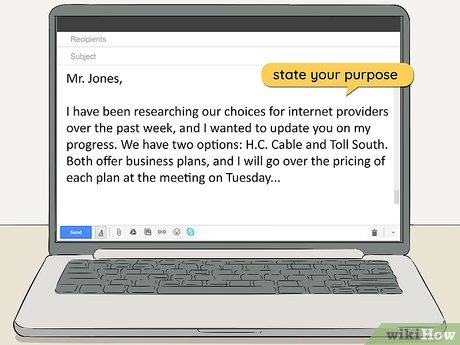
Knowing how to write a professional email in English is an essential skill for job applications, business communication, customer service, networking, and remote work. A well-written email helps you communicate clearly, make a positive impression, and get the response you need.
In this guide, you’ll learn the basic structure of a professional email and find 20 ready-to-use email templates for common workplace situations. Simply copy a template, replace the details in brackets, and adapt the tone to your recipient.
1. How to Structure a Professional Email in English
A professional email should be easy to read and understand. In most situations, you don’t need complicated vocabulary or long introductions. Focus on the purpose of your message and the action you want the recipient to take.
1. Subject line
Summarize the purpose of your message in a few words.
Example: Request for Project Update
2. Greeting
Address the recipient appropriately.
Example: Dear Ms. Johnson,
3. Opening sentence
Explain why you are writing.
Example: I’m writing to ask about the project timeline.
4. Main message
Include relevant information, context, or questions.
Example: Could you confirm whether the draft will be ready by Friday?
5. Call to action
Make the next step clear when you need a response.
Example: Please let me know by Thursday afternoon.
6. Closing and signature
End politely and identify yourself.
Example: Best regards, Alex Smith
2. How to Write a Clear Professional Email Subject Line
The subject line tells the recipient what your email is about before they open it. A useful subject is specific, concise, and accurate. Avoid vague subjects such as “Hello,” “Question,” or “Important” when you can provide more detail.
| Purpose | Professional subject line |
|---|---|
| Job application | Application for Marketing Coordinator Position – Alex Smith |
| Meeting | Meeting Request: Website Redesign Project |
| Follow-up | Follow-Up on Our October 15 Discussion |
| Information request | Request for Information About Your Services |
| Document sharing | Updated Project Proposal for Review |
| Deadline | Approval Needed by Thursday: Campaign Draft |
| Thank-you email | Thank You for Your Time and Feedback |
| Invoice | Invoice #1042 – October Services |
Use deadlines or urgency in the subject only when they are genuine. A clear subject line helps people prioritize their work without making every message sound like an emergency.
3. 20 Professional Email Templates in English
The following templates cover common professional situations. Replace the bracketed text with your details before sending. Each example can be adapted for a formal business email or a more conversational workplace message.
Template 1: Introducing Yourself Professionally
Use when contacting a new colleague, client, or business contact.
Template 2: Requesting Information
Use when you need details about a product, service, process, or project.
Template 3: Asking for a Meeting
Use to arrange a call or discuss a project with a colleague or client.
Template 4: Following Up on a Previous Email
Use when you haven’t received a response and need to follow up politely.
Template 5: Sending a Job Application
Use when emailing your CV or résumé to a potential employer.
Template 6: Thanking Someone for a Meeting
Use after a business meeting, interview, or professional conversation.
Template 7: Sending a Document or Attachment
Use when sharing a report, proposal, contract, or other file.
Template 8: Requesting Feedback
Use when you want comments on your work or ideas.
Template 9: Requesting an Update on a Project
Use when you need to know the current status of a task or project.
Template 10: Apologizing for a Mistake
Use when you need to acknowledge an error and explain how you will correct it.
Template 11: Requesting an Extension
Use when you need additional time to complete an assignment or deliverable.
Template 12: Sending a Reminder
Use when a deadline or pending action needs a polite reminder.
Template 13: Asking for Help
Use when you need support with a problem or unfamiliar task.
Template 14: Declining an Invitation Politely
Use when you cannot attend a meeting, event, or professional invitation.
Template 15: Confirming an Appointment or Meeting
Use to confirm the time and details of a scheduled meeting.
Template 16: Negotiating a Price or Fee
Use when discussing a service fee, quotation, or business proposal.
Template 17: Responding to a Complaint
Use when a customer or business partner reports a problem.
Template 18: Sending a Thank-You Email After an Interview
Use after a job interview to express appreciation and reinforce your interest.
Template 19: Asking for a Recommendation or Reference
Use when requesting a professional reference for a job or opportunity.
Template 20: Closing a Business Conversation
Use when wrapping up a project discussion or confirming next steps.
4. Useful Phrases for Professional Emails in English
These expressions help you write natural emails without repeating the same words in every message.
Opening an email
- “I hope you’re doing well.”
- “I’m writing to ask about…”
- “I’m contacting you regarding…”
- “Thank you for your email.”
- “Following our recent conversation…”
Making a request
- “Could you please send me…?”
- “Would it be possible to…?”
- “I’d appreciate it if you could…”
- “When you have a chance, could you…?”
- “Please let me know if you need anything else.”
Explaining or clarifying something
- “For your reference, I’ve attached…”
- “To clarify, the deadline is…”
- “Just to confirm, we’re expecting…”
- “For context, the main issue is…”
- “Please see the details below.”
Closing an email
- “Thank you for your time and consideration.”
- “I look forward to hearing from you.”
- “Please let me know if you have any questions.”
- “Thanks again for your help.”
- “I appreciate your assistance.”
Professional email sign-offs
| Sign-off | Best use |
|---|---|
| Best regards, | A versatile choice for most business emails. |
| Kind regards, | Polite and slightly formal. |
| Sincerely, | Formal letters and more official correspondence, especially in American English. |
| Best, | Common in established professional relationships. |
| Thank you, | Useful when making a request or expressing appreciation. |
5. Common Professional Email Mistakes to Avoid
| Less effective wording | More natural alternative |
|---|---|
| “I want you to send me the file.” | “Could you please send me the file?” |
| “Reply me as soon as possible.” | “Could you get back to me when you have a chance?” |
| “I have a doubt about this.” | “I have a question about this.” |
| “Please find the attached file” when no file is attached. | Check the attachment before sending. |
| “Dear Sir/Madam” for every email. | Use the recipient’s name when known. |
| A long paragraph with several unrelated requests. | Use short paragraphs or a numbered list. |
| “URGENT!!!” for a routine request. | Explain the actual deadline in the subject or message. |
Before sending, check these five things
- Is the subject line clear and specific?
- Have you explained the purpose in the first few sentences?
- Is the requested action or deadline easy to identify?
- Have you checked names, grammar, spelling, and attachments?
- Does the greeting and sign-off fit your relationship with the recipient?
6. Build Your Own Professional Email
Choose a situation and enter a few details to create a simple email draft you can edit before sending.
Review the draft and add any missing details before sending. This tool does not send emails.
7. Frequently Asked Questions About Professional Emails in English
How do you start a professional email in English?
Start with an appropriate greeting, such as “Dear Ms. Johnson,” for a formal message or “Hi Alex,” for a colleague. Then explain your purpose briefly, using phrases such as “I’m writing to ask about…” or “I’m contacting you regarding…”.
What is the best way to end a professional email?
Common sign-offs include “Best regards,” “Kind regards,” and “Sincerely.” Choose one that matches the level of formality and your relationship with the recipient, then include your name and relevant contact information.
How long should a professional email be?
Most routine business emails should be concise enough to read quickly. Include the context, necessary details, and a clear next step. Longer emails may be appropriate for proposals, complex explanations, or detailed project summaries.
How do you politely ask for a response in English?
You can write “I’d appreciate your feedback by Thursday,” “Could you let me know when you have a chance?” or “Please let me know if you need any additional information.” If a deadline matters, state it clearly and explain why.
Is “I hope this email finds you well” professional?
Yes. It is a conventional, polite opening, especially in formal or first-contact emails. However, it is not necessary in every message. For an ongoing conversation, a direct opening such as “Thanks for the update” may sound more natural.
Should I use contractions in professional emails?
Contractions such as “I’m,” “I’ll,” and “we’re” are common and natural in everyday workplace emails. In highly formal correspondence, you may prefer “I am” or “I will.” Consistency and audience expectations matter more than avoiding every contraction.
How can I improve my professional email writing in English?
Read examples from your industry, save useful phrases, and practice rewriting long messages into shorter ones. Before sending an email, check its purpose, tone, grammar, and requested next step. Reviewing real emails you receive can also help you learn natural business English.
Can I use these email templates for job applications?
Yes. The job application, interview thank-you, and reference-request templates are designed for common recruitment situations. Personalize each message with the company name, position, relevant skills, and details from your actual interaction.
Conclusion: Write Better Professional Emails in English
Writing professional emails in English becomes easier when you understand the basic structure and have reliable examples for common situations. A clear subject line, appropriate greeting, concise message, and polite closing can make your communication more effective.
Use these 20 professional email templates as starting points, not fixed scripts. Adapt the language to your recipient, include the details that matter, and make the next step clear whenever you need a response.
With regular practice, you’ll spend less time wondering how to phrase an email and more time communicating confidently at work.